Real Browser Sessions
Sessions run in Chrome, Firefox, Safari and Edge. JavaScript runs, cookies are set and page assets load, so the visit is recorded by your server and CDN logs as well as by your analytics.

These are automated sessions, not potential customers. They cannot be turned into leads or sales.
Every parameter below is set per campaign and applies to every session it delivers
Sessions run in Chrome, Firefox, Safari and Edge. JavaScript runs, cookies are set and page assets load, so the visit is recorded by your server and CDN logs as well as by your analytics.
Pick visitor geography by country: sessions come from IP addresses in the country you choose.
Choose how the session is attributed: direct, referral or social. Clicks from search results are a separate tool (SERP Clicks), as are clicks on your backlinks (Link Clicker).
Set the share of sessions that end on the page they arrived at.
Set how many pages a session opens, and which paths through the site it follows.
Set the average time a session spends on the site before it ends.
Set the share of sessions that arrive as a visitor the site has seen before.
Spread the daily volume evenly or concentrate it in chosen hours, in the timezone you are targeting.
Set the share of mobile and desktop sessions in the campaign.
Three steps from a configured campaign to sessions you can check against your own logs
Enter the target URL, the daily volume, geography, traffic source and the four behavioral parameters. Set the delivery schedule.
Real browsers open your pages on the schedule you set, following the behavior profile you configured.
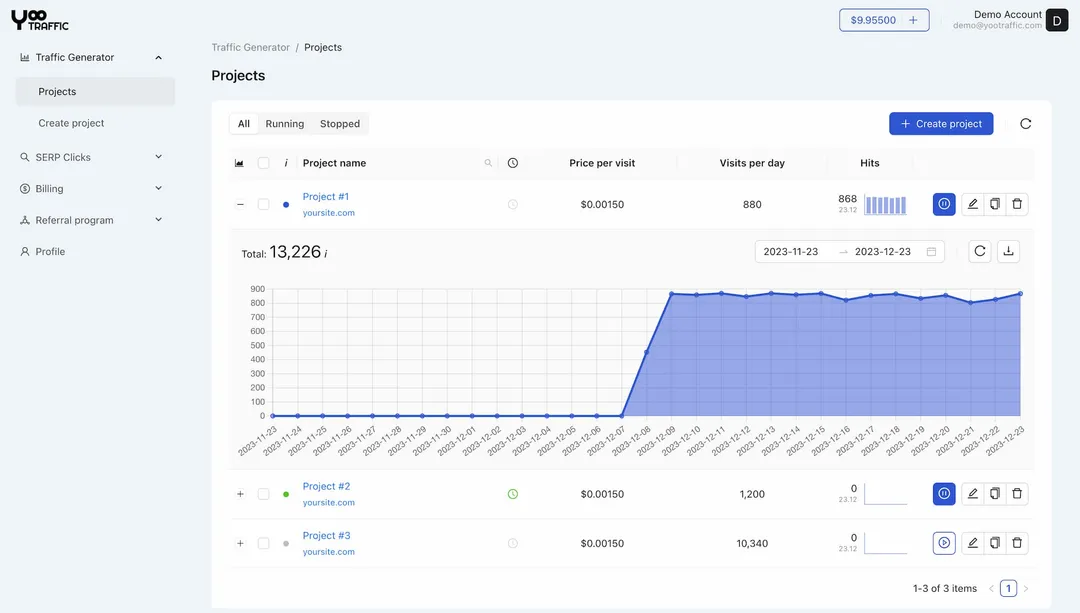
Watch delivery in the dashboard, then confirm it independently in your analytics and in your own server or CDN logs.
What the tool changes, what it leaves untouched, and how to configure it for your site
Because a real browser opens the page, executes its JavaScript and downloads its assets, the visit is written to your server access log and your CDN reporting, not only to your analytics property. You can reconcile the three against each other for the same time window.
That reconciliation is worth doing whichever service you use. If a traffic service can only demonstrate delivery inside one analytics property, you are trusting a single number that a vendor is in a position to write to directly. Your own access logs are the check that does not depend on the vendor.
Direct sessions arrive with no referrer, as though the address was typed or opened from a bookmark. Referral sessions carry the referrer of a page you nominate. Social sessions are attributed to a social platform. The choice determines which channel report the sessions land in, so pick the one that matches what you are testing or measuring.
Two sources are deliberately not on this list. Clicks from a search results page for a keyword are SERP Clicks, at $0.09 per click, because a browser has to run the search and find your listing first. Clicks on your existing backlinks are Link Clicker, at $0.003 per click. Traffic Generator does not produce search traffic, and no configuration of it will.
Read your current numbers before you set targets. Open your analytics, note the bounce rate, average session duration and pages per session your site actually records, and configure the campaign near those figures rather than at the values you would prefer to see.
Targets far above the baseline are self-defeating. A site whose real sessions average forty seconds does not become more credible with six-minute sessions; it produces a distribution with two unrelated peaks in it, visible to anyone reading the report, starting with you.
The rate starts at $0.0015 per session and rises with the session duration you configure, because a longer session occupies a real browser for longer. Duration is therefore a cost decision as well as a behavioral one: set it from what your site actually records rather than from what looks good, so you do not pay for longer sessions than you need.
Start at roughly 30 to 50 percent of the traffic the site already receives and increase in steps, checking after each one what moved in your reporting and what did not. A campaign that doubles a site's traffic in a day tells you nothing, because you cannot separate its effect from anything else. Billing runs from an account balance: a $5 minimum deposit, no subscription, and unused funds, excluding bonus credits, refundable within 14 days of the payment. Nothing is charged while a campaign is paused. Cost depends on two settings you fix before launch: session duration and daily volume.
There is no claim here that the traffic is undetectable, and you should treat that claim with suspicion wherever it is made. Volume and pacing are under your control, which means conspicuous patterns are too: a sudden multiple of your normal traffic is obvious in your own reporting before it is obvious anywhere else.
Point campaigns only at sites you own or are authorized to work on. Do not use the resulting figures to represent audience size to advertisers, partners or investors, who are entitled to numbers that describe real people. And treat the tool as one input beside content, links and technical work rather than as a replacement for any of them.
Direct, referral and social sessions with the engagement profile you set.
$0.0015/session
1,000 sessions: $1.50 to $6.00, by session duration
Get StartedWorking out a budget? Traffic cost calculator
Country targeting in 52 countries. See every location
Acceptable use, data handling and the limits that apply to every tool are in the Trust Center
Straight answers about what Traffic Generator delivers and what it costs
No. The sessions are produced by automated browsers, so there is no person behind them to fill in a form or buy anything. Traffic Generator exists to change measurable traffic metrics and to test how a site behaves under traffic. For customer acquisition, use channels that reach actual people.
There is no guarantee that it will. Behavioral data is one input among many in ranking systems, search engines discount signals they judge to be artificial, and the effect varies by site, query and search engine. Anyone promising a ranking outcome from traffic alone is promising something they cannot control.
Yes, with the source attribution you configured. Because these are real browsers that load the page and its assets, the same visits also appear in your server access logs and CDN reporting, so you can verify delivery independently of both your analytics and our dashboard.
The load is whatever you configure, since you set the daily volume and how it is spread across the day. The risk that is real is one of proportion rather than of load: a campaign several times larger than your normal traffic produces an obvious step in your own reporting and makes the period harder to interpret afterwards.
Delivery begins within hours of activating a campaign, and you control the daily volume from then on. Start at around 30 to 50 percent of your current traffic and increase in steps, so you can still tell which change produced which effect.
Each delivered session is deducted from your account balance at a rate starting from $0.0015, which rises with the session duration you configured, since a longer session holds a real browser for longer. The minimum deposit is $5, there is no subscription or minimum order, and unused funds can be refunded within 14 days of the payment, excluding bonus credits.
A CTR bot on real browsers: it searches your keyword on Google, Bing or Yandex, finds your listing and clicks it, at $0.09 per click
$0.09/click
Backlink activation: real browsers open pages that link to you and click through to your site, at $0.003 per click
$0.003/click
Set the parameters, run a modest volume, and check the result against your own logs before you scale it